The pixel stretch effect, and how to make one on a phone
Pixel stretch takes one line of pixels from a photo and repeats it outward, so the colours in that line smear into long ribbons across the frame. It is normally a Photoshop job: a one-pixel selection and a free transform. Slean has a pixel stretch editor on iPhone and Android that does it on the phone.
By Emre, who builds Slean. Updated 1 September 2026.
You have seen this on album covers and posters: a photograph where part of the image dissolves into bands of colour running off the edge of the frame, as though the picture were melting sideways.
The mechanic behind it is simpler than it looks.
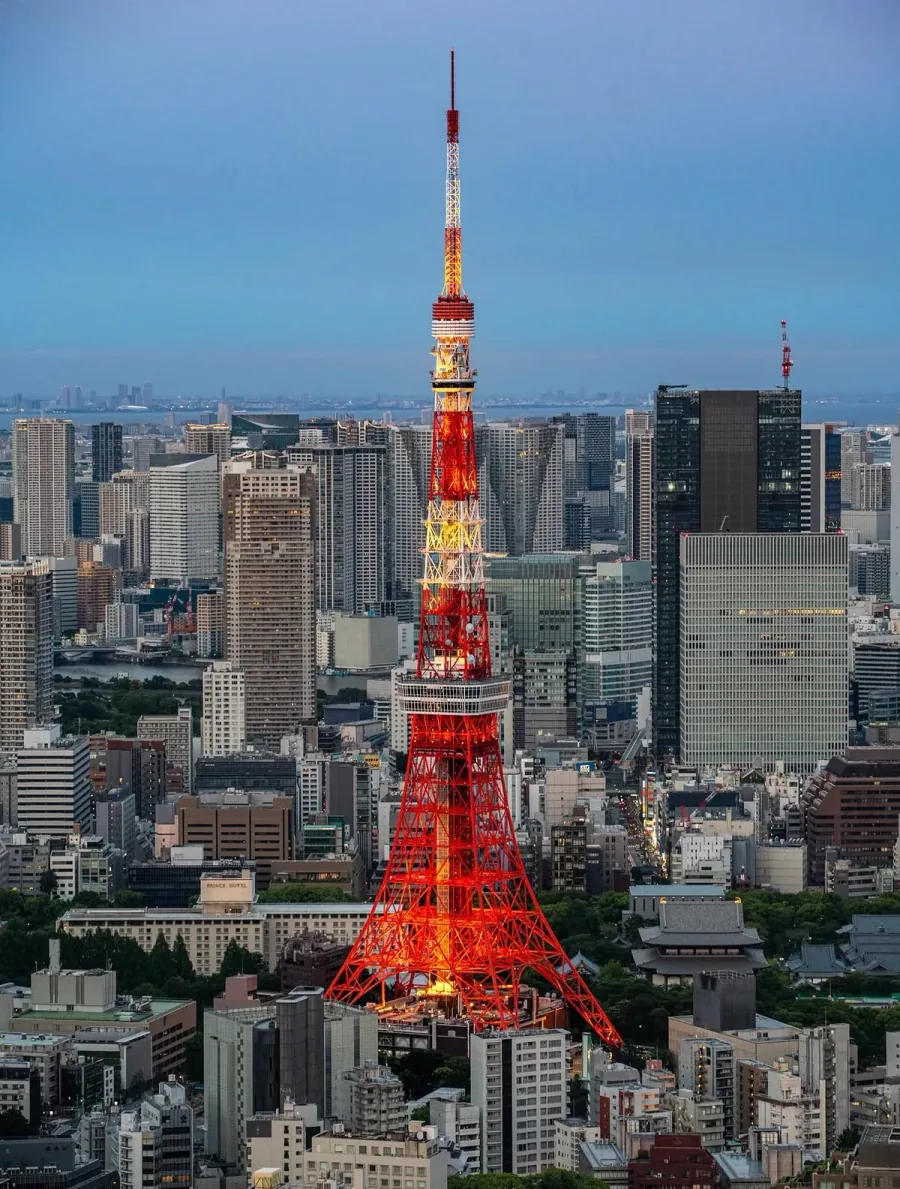
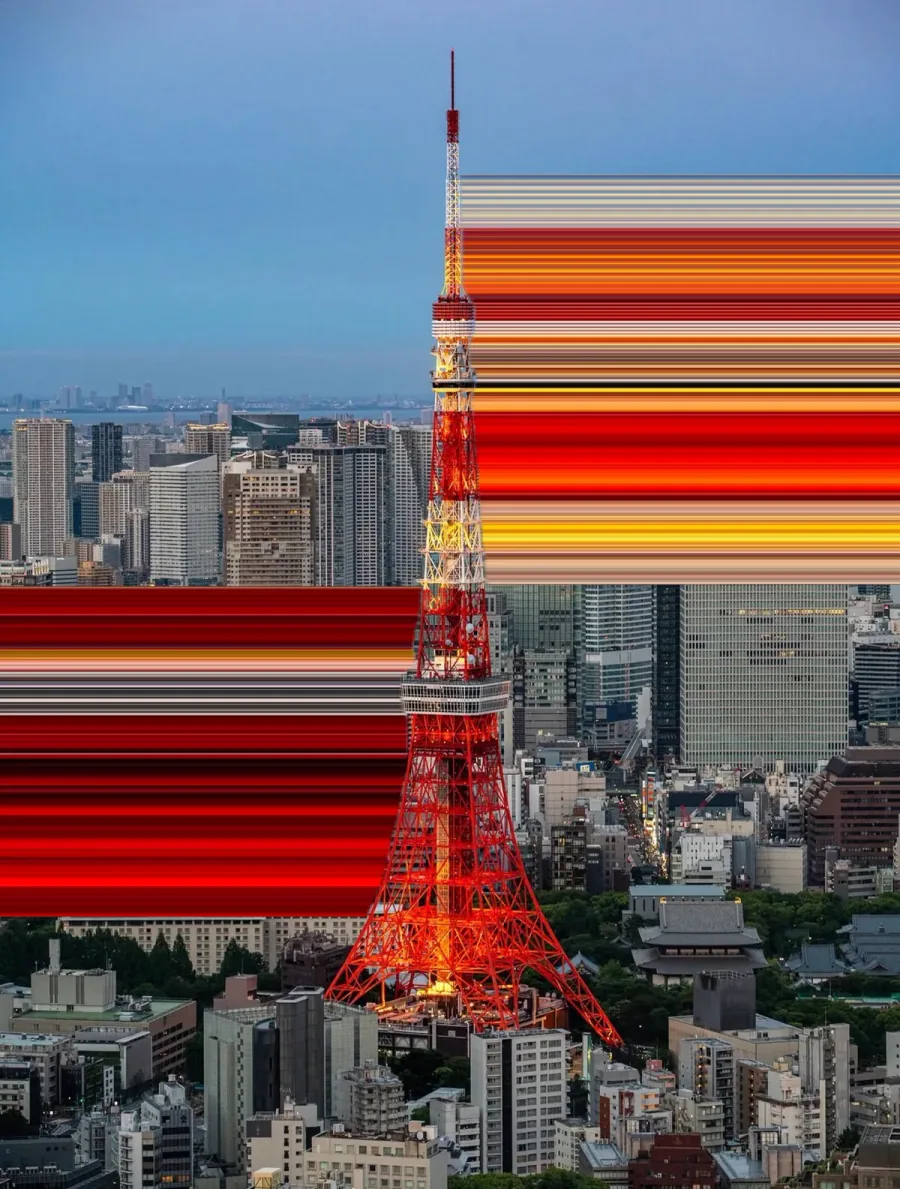
What the effect actually is
Take a photo. Pick one row of pixels — a single horizontal line, one pixel tall. Now repeat that exact row downward, hundreds of times, until it fills the bottom half of the image.
Every colour that happened to fall on that line becomes a vertical stripe. A bright window becomes a bar of yellow. A dark gap between buildings becomes a black band. The result reads as motion or as light bleeding, even though nothing has moved and nothing has been painted in.
That is the whole idea. Everything else — curves, tapering, protecting a subject from the smear — is refinement on top of it.
Why the placement of the line decides everything
Because the stretch is a copy of one line, the entire result is determined by which line you choose. Move it up by twenty pixels and you get a completely different image.
- Pick a line with contrast. A row that crosses lights, edges or strong colour gives you ribbons. A row through a flat grey sky gives you a flat grey rectangle.
- Stretch away from the subject, not through it. If the line sits across a face, the face smears. Usually you want the line just below or beside the thing you are keeping.
- Long stretches read as motion; short ones read as texture. Both are useful, and they are different pictures.
- Night shots are the easy win. Point lights against dark backgrounds produce the cleanest ribbons, which is why so many examples of this effect are cities at night.
How it is normally done, and why that is annoying
In Photoshop the recipe is: rectangular marquee, drag a selection one pixel tall, copy to a new layer, free transform, then drag the handle to the edge of the canvas. It works, it has worked for twenty years, and it needs a desktop and a licence for what is fundamentally one operation.
The phone versions of this mostly do not exist. Filter apps offer a fixed "stretch" preset with no control over where the line goes, which — given the previous section — means no control over the result.
Doing it on the phone
Slean includes a pixel stretch editor on both iPhone and Android. You draw the stretch path directly on the photo, and the ribbons follow it.
- 1Open a photo in Slean and choose Pixel Stretch.
- 2Move the sampling bar over the exact strip of colour you want to pull. This is the decision that makes or breaks the image — everything downstream is a copy of what sits under that bar.
- 3Tap the arrow for a straight pull, or drag it to draw a curve through the composition. Curved paths get draggable control points, so a rough route can be nudged into the shape you meant.
- 4Shape bends the centreline; Warp changes the ribbon's width along its length. There are presets for the two shapes people reach for most — a rounded arc and an S curve — which beat drawing a smooth curve by hand on a phone screen.
- 5Tune the taper, twist, opacity and coloured edges, comparing against the original as you go.
- 6Turn on subject protection if the ribbon is eating into something you wanted to keep sharp.
- 7Save. The export is full resolution, not a downscaled preview.
Two controls do most of the work and they are worth separating in your head. Shape decides where the ribbon goes. Warp decides how thick it is along the way. A ribbon that reads as motion is usually a simple path with a strong taper; one that reads as texture is a busier path held at an even width.
All of this happens on the device. The image is not uploaded anywhere to be processed, and the export is fast enough that you are not left watching a spinner.
Things worth knowing before you try it
- The effect is destructive to whatever it crosses. Work on a copy if the original matters, or use subject protection.
- It rewards flat, graphic compositions. A busy scene with detail everywhere turns into noise when smeared.
- It is one of the few effects that still looks deliberate at high strength. Half-hearted stretches usually look like a rendering error rather than a choice.
- On iPhone, Pixel Stretch needs iOS 17 or later, even though Slean itself runs on iOS 15.
Questions people actually ask
- What is the pixel stretch effect?
It is an image effect where a single row or column of pixels is repeated across part of the frame, turning the colours in that line into long ribbons. It is used to suggest motion, light trails or a dissolving edge, and it is common on album covers and posters.
- How do you do a pixel stretch without Photoshop?
Use an app that lets you place the stretch line yourself. Slean has a pixel stretch editor on iPhone and Android where you draw the path on the photo, adjust the shape and falloff, and export at full resolution on the device. Fixed one-tap filters generally will not work, because the whole result depends on where the line sits.
- Can you make a pixel stretch on Android?
Yes. Slean's pixel stretch editor is on Android as well as iPhone, with the same straight and curved paths and the same full-resolution export.
- Why does my pixel stretch look flat and boring?
Almost always because the stretch line crosses a low-contrast part of the image. The ribbons are a direct copy of the colours on that line, so a line through an even sky produces an even block. Move the line so it crosses lights, edges or strong colour.
- Does pixel stretch reduce the quality of the photo?
The stretched region replaces whatever was underneath it, so it is destructive in that area, but the rest of the image is untouched and Slean exports at full resolution rather than saving a downscaled preview. Work on a copy if you want to keep the original framing.
- How much does Pixel Stretch cost?
Slean is free to install on the App Store and Google Play, and a lot of the app — sorting by size, every filter, duplicate and similar scanning, full-screen review, deleting, crop and rotate — is free to use.
Related reading
- What Slean isSlean is a photo and video cleaner for iPhone and Android. It sorts by size, groups duplicates and near-identical shots, and runs on the phone.
- Duplicate photos and similar photos are not the same problemA duplicate is a second copy of one photo. A similar photo is a different photo that looks close to it. Most phones only find the first kind.
Pixel Stretch is part of Slean, on iPhone and Android. Free to install, and the export is full resolution.

