What the iPhone's Duplicates album finds, and what it quietly skips
The iPhone Photos app finds duplicates under Utilities and merges them, keeping the highest-quality version. It only matches photos that are effectively the same file, so bursts, retakes and edited copies never appear there. It also needs to finish analysing the library first, which happens while the phone is locked and charging.
By Emre, who builds Slean. Updated 1 September 2026.
Apple added duplicate detection to Photos in iOS 16, and it is better than most people give it credit for. Before you install anything, use it. It costs nothing and it handles the cases where deleting is risk-free.
Where the album is
- 1Open Photos.
- 2On iOS 18 and later, go to Collections, then Utilities. On iOS 16 and 17, go to the Albums tab and scroll to Utilities.
- 3Tap Duplicates. If you do not see it, your library has no detected duplicates or the analysis has not finished.
- 4Tap Merge on a group, or Select then Merge to clear several at once.
Merge is smarter than delete. It keeps the highest-quality version and folds the metadata from the others into it, so if one copy had a caption and another had the original date, you end up with both.
Why the album is often empty
The most common complaint is that the Duplicates album shows nothing, or shows three groups in a library of forty thousand photos. Two different things cause that.
The first is timing. Photos analyses your library in the background, and it only does that seriously when the iPhone is locked, charging and on Wi-Fi. On a large library, or one you just restored from iCloud, that can take a day or more. Leave the phone plugged in overnight and check again before concluding the feature is broken.
The second is the real limit, and no amount of waiting fixes it: the album is looking for copies.
The line Apple deliberately does not cross
Duplicates in the Photos app means photos that are effectively the same image. Two saves of the same file. The same picture downloaded twice. A photo that came in from a message and also from AirDrop.
It does not mean photos that look alike. If you took eight frames of the same person against the same wall, those are eight distinct photographs as far as Photos is concerned, and they will never show up in Utilities. Neither will a burst. Neither will the shot you retook two seconds later because the first one was blurry.
That is a design decision, not an oversight. Merging is destructive and automatic, and Apple ships it to everyone. Grouping six genuinely different photos and inviting you to keep one is a judgment call about your memories, and at that scale the safe answer is to not make it.
Practical consequence: in most libraries the Duplicates album accounts for a small fraction of the space you could recover. The volume is in retakes, bursts, screenshots and long videos, none of which it touches.
Other things it will not do
- Screenshots. Two screenshots of the same screen taken minutes apart are usually pixel-identical and will merge. Two of slightly different screens will not, and screenshots are rarely worth keeping either way.
- Videos. Duplicate videos are matched, but the album is dominated by photos and long videos are the single biggest storage item in most libraries. Finding them needs a size filter, not a duplicate finder.
- Downscaled re-saves. A photo that went through a messaging app and came back smaller is not the same file any more. It usually will not merge.
- Anything in a shared library you do not own. Merging works on your own library.
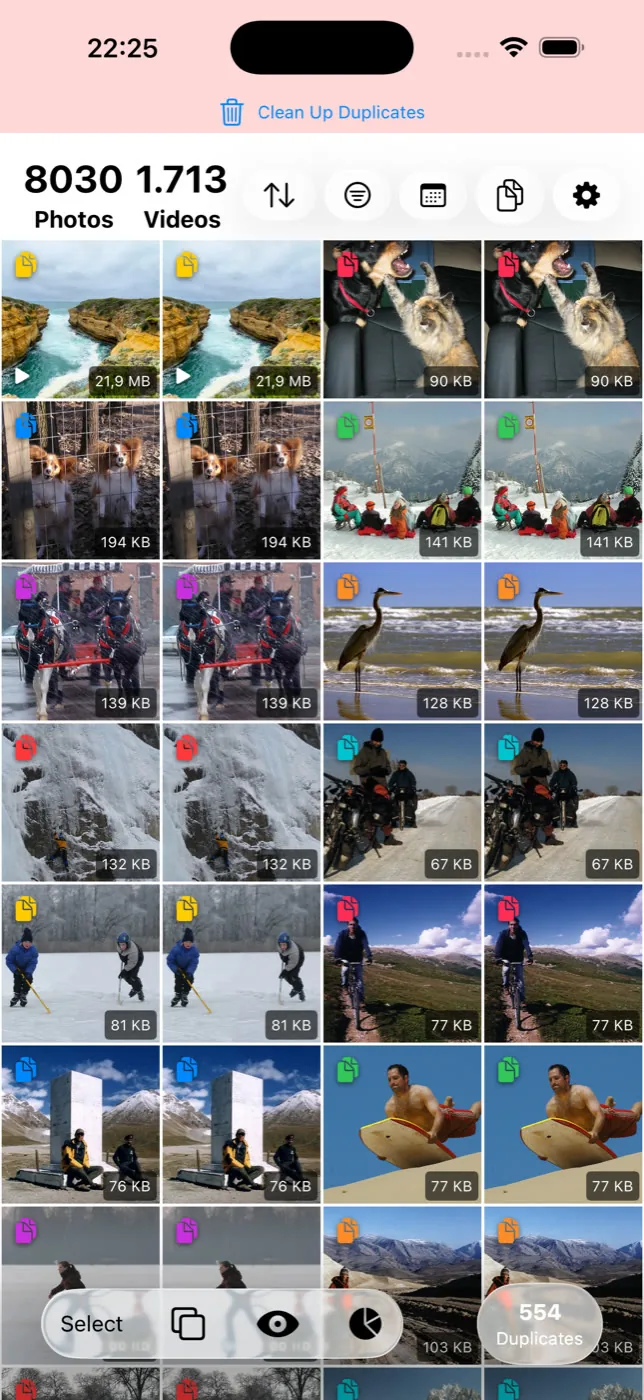
What to do after you have run it
Once Utilities is empty, the remaining work is the part that needs your eyes. That means looking at groups of similar photos and choosing keepers, and it means dealing with the large files that duplicate detection was never aimed at.
Slean does that pass on the phone. It has a separate mode for similar photos, filters for screenshots, video and file size, and it shows every group full-screen before anything is deleted. Nothing is uploaded and there is no account. If the Photos app already solved your problem, you do not need it.
Android splits the same job across Files by Google and Samsung's My Files, with a comparable blind spot. How duplicate removal works on Android.
Questions people actually ask
- Why is the Duplicates album missing from my iPhone?
Utilities only shows a Duplicates entry when duplicates have actually been found. If your library is clean, or Photos has not finished analysing it yet, the row does not appear at all. Analysis runs while the phone is locked and charging, so give it an overnight charge before assuming something is wrong.
- Does merging duplicates in Photos delete the original?
No. Merge keeps the highest-quality version, combines the metadata from the copies into it, and moves the rest to Recently Deleted, where they stay for around 30 days.
- Can the iPhone find similar photos, not just duplicates?
Not as a dedicated feature. The Duplicates album only matches photos that are effectively the same image. Bursts, retakes and slightly different shots of the same scene are treated as separate photographs and never appear there.
- Does deleting duplicates on iPhone free up iCloud storage?
Yes, if you use iCloud Photos, because the library is synced. The space comes back once the items leave Recently Deleted, either after about 30 days or when you empty it manually.
- Is it safe to merge everything in the Duplicates album at once?
Generally yes, because the album only contains copies of the same image. Select at the top right, then Select All and Merge. If you want to be careful, spot-check a few groups first — merging is reversible only through Recently Deleted.
Sources
Related reading
- Duplicate photos and similar photos are not the same problemA duplicate is a second copy of one photo. A similar photo is a different photo that looks close to it. Most phones only find the first kind.
- Best photo cleaner app for iPhone: five names, and how to choose between themFive iPhone photo cleaners compared on what their listings let anyone check: privacy label, cost, what they find. Plus the two-minute test for which kind you need.
- "Free up space" in Google Photos does not clean anythingFree up space deletes local copies of photos already backed up. Your phone gets emptier, your library does not. Here is what to do instead.
- What Slean isSlean is a photo and video cleaner for iPhone and Android. It sorts by size, groups duplicates and near-identical shots, and runs on the phone.
- How to delete duplicate photos on AndroidFiles by Google and Samsung's My Files find exact duplicates free. The steps, why WhatsApp causes most of them, and what both tools miss.
Once Utilities is empty, Slean handles what is left: bursts, retakes, screenshots and the large videos, sorted biggest first.

