What Slean is
Slean is a photo and video cleaner for iPhone and Android. It keeps the familiar phone-gallery layout and adds what that gallery leaves out: sorting by file size, grouping near-identical shots, and filters that combine. It also deletes in bulk and compresses media. Everything runs on the device, with no ads and no account.
By Emre, who builds Slean. Updated 1 September 2026.
The short version
Slean looks and moves like the photo app already on your phone. The same dense grid, the same tap to open, the same scroll. That is deliberate: nobody wants to learn a new way to look at their own pictures.
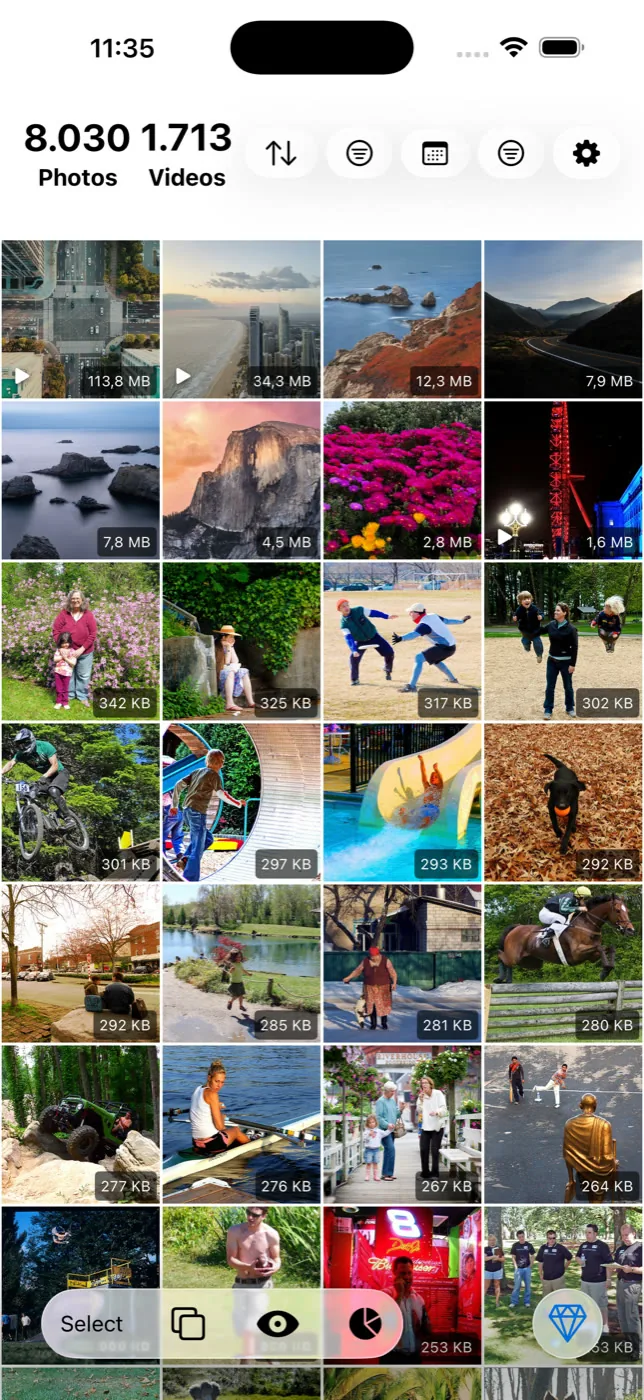
What it adds is the short list of things that app leaves out. You cannot sort your camera roll by file size. You cannot ask it to group the six near-identical frames you shot of one doorway. You cannot combine two filters. Slean does those, and puts the file size on every thumbnail so it is obvious where the storage actually went.
Most libraries have three problems at once: copies of the same file, dozens of near-identical shots of one moment, and a handful of very large videos that quietly account for most of the space. Slean handles all three, on the phone, without sending your library anywhere.
What it does
- Sort by size. Largest file first, across the library or inside any filter. Neither the iPhone Photos app nor most Android galleries will do this, and it is the quickest way to see where your storage went.
- Duplicate detection. Finds photos and videos that are effectively the same file and groups them.
- Similar detection. Groups near-identical shots — bursts, retakes, several attempts at the same photo — so you can pick one and clear the rest. Both passes use detection written for Slean rather than an off-the-shelf library.
- Filters. Screenshots, favourites, media type, file size ranges, date ranges and specific albums. Filters combine, so "videos over 100 MB from last year" is one query.
- Bulk review and deletion. Select across a group or a filter, review full-screen with date, size and file type, then delete in one pass.
- Compression. Photos and videos, with a preview of the result and the size saving before you commit.
- Photo tools. Crop, rotate, resize, collage and Pixel Stretch.
- On This Day and statistics. A prompt to review the same date in previous years, and a record of what you have cleaned.
Where the two platforms differ
Slean is a native app on each platform — Swift and SwiftUI on iOS, Kotlin and Jetpack Compose on Android. It is not one cross-platform codebase wrapped twice, which is why it feels like the phone it is running on. Android is a real build, not a port: the cleaner, the filters, the compression and the photo tools are all there.
| Feature | iPhone | Android |
|---|---|---|
| Duplicate and similar detection | Yes | Yes |
| Filters, bulk delete, full-screen review | Yes | Yes |
| Photo and video compression | Yes | Yes |
| Crop, resize, collage, Pixel Stretch | Yes | Yes |
| On This Day, statistics | Yes | Yes |
| AI photo editing | Yes, optional | Not available |
| Live Photo preview | Yes | Not applicable |
| Minimum OS | iOS 15.0 | Android 8.0 |
The privacy boundary, stated precisely
"On-device" is a phrase every cleaner uses, so here is what it covers in Slean.
Sorting, scanning, duplicate and similar detection, filtering, compression, crop, resize, collage and Pixel Stretch all run on your phone. Your photo library is not uploaded to Slean to be cleaned. There is no account to create and no sign-in, and there are no ads or advertising SDKs anywhere in the app.
The privacy page has the longer version.
What it stays out of
Slean works on your photo library and nothing else. No app caches, no system files, no battery or speed claims — the category is full of apps that promise all of that and deliver a progress bar. Review is full screen and deliberate rather than a swipe game.
It is also not a backup tool. Back up anything irreplaceable before a big cleanup pass, the same as you would before any bulk delete.
Who makes it
Slean is built by Emre Ertunç, who writes both apps himself, natively, and answers the support email. One person owning the whole product is why it has no ads, no trackers and no account: there is no growth team that needs a funnel. More about that here.
Questions people actually ask
- Does Slean upload my photos?
No. Sorting, scanning, duplicate and similar detection, filtering, compression and the photo tools all run on the device. Slean has no server that holds your library and no account that identifies you.
- Does Slean need an account?
No. There is no sign-up, no email and no login. Purchases are handled by App Store or Google Play billing, and restoring a purchase uses your existing store account.
- Is Slean free?
It is free to install on the App Store and Google Play, and the free app covers things like sorting by size, every filter, duplicate and similar scanning, screenshot cleanup, full-screen review, deleting, crop and rotate, On This Day and your cleanup statistics.
- Does Slean show ads?
No. There are no ads and no advertising SDKs in the app.
- What platforms and languages does Slean support?
iPhone and iPad running iOS 15 or later, and Android phones running Android 8.0 or later. The app is available in 14 languages, including English, German, Spanish, French, Italian, Portuguese, Russian, Turkish, Arabic, Hindi, Indonesian, Japanese, Korean and Simplified Chinese.
- Can Slean recover photos I deleted by mistake?
Slean itself has no undo, but the phone does. Deleted items go to Recently Deleted on iPhone or Trash on Android and stay there for at least 30 days, so you can restore them from the Photos or Gallery app.
Sources
Related reading
- Duplicate photos and similar photos are not the same problemA duplicate is a second copy of one photo. A similar photo is a different photo that looks close to it. Most phones only find the first kind.
- What the iPhone's Duplicates album finds, and what it quietly skipsThe Photos app has a built-in duplicate finder. It works well, it is free, and it only looks for copies. Here is where it stops and what to do about the rest.
- "Free up space" in Google Photos does not clean anythingFree up space deletes local copies of photos already backed up. Your phone gets emptier, your library does not. Here is what to do instead.
Slean is on the App Store and Google Play, in 14 languages, and free to install.

