Duplicate photos and similar photos are not the same problem
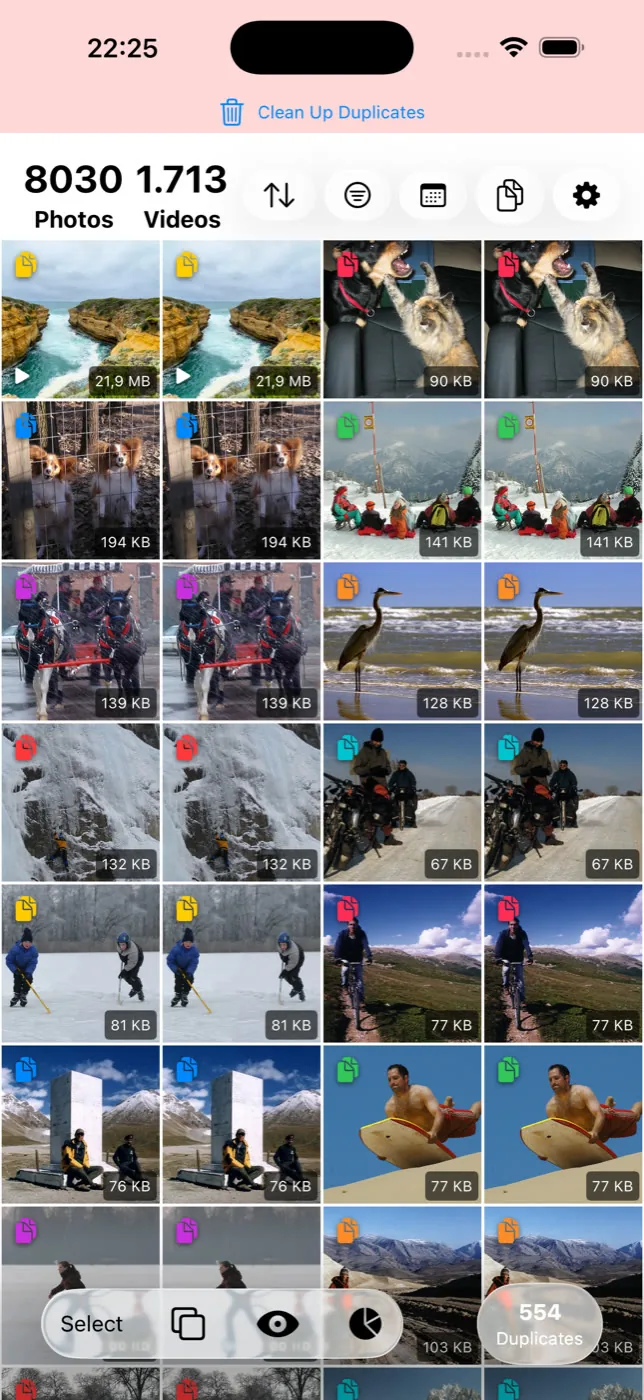
A duplicate photo is a second copy of the same shot — the same moment, saved twice. A similar photo is a genuinely different photo that happens to look close to another, like four tries at one portrait. Phone galleries find duplicates and stop there. Slean scans for both and keeps them in separate modes.
By Emre, who builds Slean. Updated 1 September 2026.
If you have ever run your phone's built-in duplicate cleaner, got a satisfying number back, and then scrolled your library and still found nine versions of the same sunset, you have run into this distinction without anyone naming it for you.
The two problems look identical from the outside. They are not, and the reason matters when you are deciding what to delete.
A duplicate is one photo stored twice
Duplicates come from mechanics, not from you. You saved an image from a chat thread that you had already saved last week. You edited a photo and exported a copy. You AirDropped a picture to yourself. You restored a backup on top of a library that already had the same photos in it. In every case there is one original moment and more than one file.
This is the easy case, and it is easy for a specific reason: there is a right answer. Keep one, delete the rest, lose nothing. You do not have to look at them, because they are the same picture.
Duplicates are also where most storage myths come from. People assume their library is full of them. In practice, unless you have restored a backup badly or saved a lot of images out of messaging apps, exact duplicates are usually a small slice — a few hundred megabytes, not a few gigabytes.
A similar photo is a real photo you took on purpose
Similar photos come from you, and there are far more of them. You took six frames of your friend in front of a doorway because you wanted one where nobody blinked. You held the shutter and got a burst of eleven. You photographed the same beach four times in six minutes because the light kept changing.
None of these are copies. Every frame is a separate photo with its own content. But you only wanted one of them, and the other five have been sitting in your library since 2019 taking up space and making the scroll longer.
This is the hard case, and it is hard for the opposite reason: there is no right answer that software can compute. Which of the six frames is the keeper depends on whose eyes are open, which one is sharper, and which one you actually like. That judgment is yours. What a cleaner can do is put the six side by side so you can make it in three seconds instead of scrolling past them one at a time for a year.
Why your phone only solves half of it
The Photos app on iPhone has a Duplicates album, and Files by Google has a duplicate-files card. Both are genuinely useful and both are free. Both are also solving the easy problem: they look for copies, not for near-misses.
There is a reasonable argument for that. A tool that ships to a billion people and deletes photos should be conservative. Grouping six different photos together and suggesting you keep one is a judgment call, and Apple and Google would rather not make judgment calls about your memories at that scale.
That is why third-party photo cleaners exist. Not because the built-in tools are bad, but because they deliberately stop at the point where the work stops being mechanical — and the work that is left over is where the storage actually is.
How Slean separates the two
Slean runs them as two different modes, on both iPhone and Android, rather than blending everything into one pile labelled "clutter".
- Duplicate mode looks for photos that are effectively the same image. Matches are strict here on purpose. A group in duplicate mode should be something you can clear without looking closely.
- Similar mode is looser. It compares how photos look, and it also takes into account that photos taken close together in time and place are more likely to belong to the same moment. That is what pulls a burst back together into one group instead of eleven unrelated thumbnails.
Both run on your phone. Neither uploads anything. Slean groups the results and shows you each group full-screen with the date, the file size and the file type, and nothing is deleted until you say so.
What each mode will and won't catch
Being straight about this saves you from expecting the wrong thing.
| Case | Duplicate mode | Similar mode |
|---|---|---|
| Same file saved twice | Yes | Skipped — already handled |
| Photo re-saved at a smaller size | Often not | Usually yes |
| A crop of an existing photo | No | Sometimes, depends how heavy the crop is |
| Edited version next to the original | Usually not | Often yes |
| Burst of ten frames | No | Yes, as one group |
| Two screenshots of the same screen | Yes if pixel-identical | Yes, judged more strictly than photos |
| Two photos of the same view hours apart | No | Sometimes, less likely than a burst |
Which one to run first
Run duplicates first. It is fast, the decisions are free, and it clears the noise before you start making real choices. Then run similar photos when you have ten quiet minutes, because that is the pass where you will actually be choosing between pictures of people you know.
If you want the fuller storage picture — the large videos and old screenshots that usually outweigh both of these — that is a separate job. Slean filters by file size, media type and date for exactly that reason.
Questions people actually ask
- Is a burst of photos duplicates or similar photos?
Similar photos. Every frame in a burst is a separate photo with different content, even if the difference is a fraction of a second. Duplicate detection will not group them; similar detection will, and in Slean a burst usually comes back as one group.
- Will a duplicate cleaner delete the original too?
It should not. Slean keeps one photo from every group and only deletes the others, and it shows you the group before anything happens. On iPhone and Android, deleted photos also go to the Recently Deleted or Trash folder for at least 30 days, so a mistake is recoverable.
- Why does my phone say I have no duplicates when I clearly do?
Because the built-in tools look for copies of the same file, not for photos that look alike. Six versions of the same shot are six different photos to the Photos app, so they never appear in the Duplicates album.
- Do similar photos take up more space than duplicates?
In most libraries, yes, by a wide margin. Duplicates are usually a handful of accidental copies. Similar photos accumulate every time you take more than one shot of anything, which for most people is most of the time.
- Can Slean find similar videos as well as photos?
Yes. Slean compares videos too, using a frame from the video rather than the whole file. It is slower than comparing photos and it is less certain, so groups of videos are worth reviewing more carefully before deleting.
Sources
Related reading
- Best photo cleaner app for iPhone: five names, and how to choose between themFive iPhone photo cleaners compared on what their listings let anyone check: privacy label, cost, what they find. Plus the two-minute test for which kind you need.
- What the iPhone's Duplicates album finds, and what it quietly skipsThe Photos app has a built-in duplicate finder. It works well, it is free, and it only looks for copies. Here is where it stops and what to do about the rest.
- "Free up space" in Google Photos does not clean anythingFree up space deletes local copies of photos already backed up. Your phone gets emptier, your library does not. Here is what to do instead.
- What Slean isSlean is a photo and video cleaner for iPhone and Android. It sorts by size, groups duplicates and near-identical shots, and runs on the phone.
Slean runs both passes — strict duplicates and looser similar grouping — and shows you every group before anything is deleted.

