Android storage full? Here is what to delete, in order
When Android storage is full, delete in this order: long videos first, since one clip can outweigh hundreds of photos; then downloads and messaging-app media; then screenshots; then duplicate and near-identical photos; then app caches last, because they rebuild. Free up space in Google Photos is a separate step, and it offloads rather than deletes.
By Emre, who builds Slean. Updated 1 September 2026.
Android says storage is full, and the fastest way to actually fix it is to work in the order below rather than randomly deleting apps and hoping. Some categories return gigabytes for ten minutes of effort. Others return a few hundred megabytes for the same ten minutes. Do the first kind first.
1. Long videos
A nine-minute video of a car park is bigger than a thousand photos. Video is where most phones actually run out of room, and a handful of long clips you filmed once and never watched again is usually the single biggest chunk available.
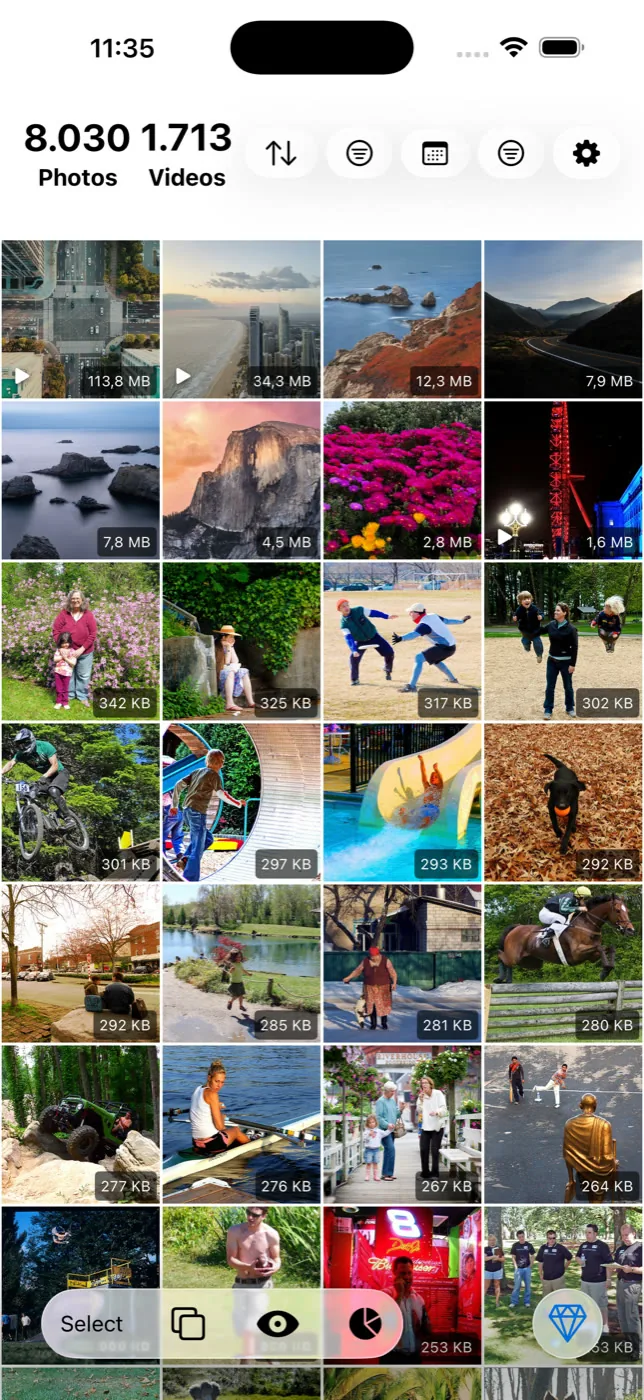
The fastest way to find them is to sort by file size, largest first. Android's Settings, then Storage, gives you a breakdown by category but not by individual file, and most gallery apps have no size sort at all. Slean sorts the whole library biggest first and filters by an exact size range, which turns this step into about thirty seconds.
2. Downloads and messaging-app media
The Downloads folder collects PDFs, forwarded files and one-off saves that nobody ever goes back to clear. Alongside it, WhatsApp and Telegram build their own media folders from everything sent in every chat you are in, whether or not you asked for it. These two categories accumulate quietly because nothing in Android prompts you to look at them, and together they are often the second-biggest recoverable chunk after video.
3. Screenshots
Screenshots build up faster than almost anything else in a photo library, because taking one has no friction and no built-in prompt to review or delete it later. Most are safe to bulk-delete — the full case for that, and how to keep the few worth keeping, is here.
4. Duplicates and near-identical shots
Exact duplicates are usually the smallest category on this list in raw gigabytes, but they are the fastest to clear because there is no judgment involved — Files by Google's duplicate finder handles them in a couple of minutes. Near-identical shots — bursts, retakes, several tries at one photo — add up to more, but take longer because you are actually choosing which frame to keep; Android has no built-in tool for this part.
5. App caches
Caches are last on this list on purpose. They are usually the smallest gain, and they rebuild themselves the moment you use the app again, so clearing them is a temporary fix rather than a lasting one. Android already clears cache automatically under storage pressure in many cases, which is part of why chasing it manually tends to disappoint.
"Free up space" in Google Photos is a separate move from all of the above — it offloads local copies of photos already backed up rather than deleting anything from your library. Full explanation here. Run it after cleaning, not instead of it, or you back up clutter you were about to delete anyway.
Menu paths differ by phone
The exact path to Settings → Storage, and what "Analyze storage" is called, differs between Samsung's One UI, stock Android on Pixel phones, and other manufacturers' skins. If a menu name in a guide does not match what you see, look for the nearest equivalent — Storage, Device care, or similar — rather than assuming the feature is missing.
On iPhone the order is similar but the menus and the biggest offenders differ, and Messages attachments become their own category. Here is the iPhone order.
Questions people actually ask
- What usually takes up the most space on an Android phone?
Video, in most cases — a small number of long or high-resolution videos typically outweighs the entire photo library. After that, messaging-app media folders and downloads are the next largest, mostly because nothing prompts you to review them.
- Should I clear app caches first when storage is full?
No — do it last. Caches rebuild themselves as soon as you reopen the app, so the space returns temporarily at best, and the gain is usually smaller than video, messaging media, screenshots or duplicates.
- Does uninstalling apps free up more space than deleting photos?
It depends on the app, but for most people the photo library is the bigger opportunity, especially once video, messaging-app media and screenshots are counted in. A handful of large games can be an exception worth checking individually in Settings → Storage.
- Why is my storage still full after I moved photos to Google Photos?
Backing up to Google Photos does not remove anything from the phone by itself. You still need to run Free up space to clear the local copies of what has already been backed up — backing up and offloading are two separate steps.
- Is it safe to delete the WhatsApp media folder directly through a file manager?
It removes the media from your phone, but it does not clear it from the chat itself in a way WhatsApp is always consistent about, and it can affect media you meant to keep. Using WhatsApp's own storage management, or Files by Google's duplicate finder for the exact-copy case, is more predictable than deleting the folder wholesale.
Sources
Related reading
- How to delete screenshots on AndroidScreenshots pile up faster than photos and are safer to bulk-delete. Where they live, why they accumulate, and how to clear them in one pass.
- How to delete duplicate photos on AndroidFiles by Google and Samsung's My Files find exact duplicates free. The steps, why WhatsApp causes most of them, and what both tools miss.
- "Free up space" in Google Photos does not clean anythingFree up space deletes local copies of photos already backed up. Your phone gets emptier, your library does not. Here is what to do instead.
- iPhone storage full? Delete these first, in this orderNot everything you could delete returns the same amount of space. Here's the order that actually works, from long videos down to app caches.
Sort biggest first to find the videos, then clear the screenshots and near-identical shots. Slean does all three on the phone.

