How to find similar photos on Android
Android has no built-in feature that systematically finds similar photos, unlike its duplicate-file tools. Google Photos occasionally surfaces stacked suggestions, but that is not a full pass over your library and cannot be run on demand. Third-party apps such as Slean fill that gap by comparing how photos look.
By Emre, who builds Slean. Updated 1 September 2026.
If you have already run Files by Google's duplicate finder and your library is still full of near-identical shots, you have found the actual gap in what Android gives you for free.
There is no built-in similar-photo finder
Files by Google and Samsung's My Files both find duplicate files — see how to delete duplicate photos on Android for the steps. Neither has an equivalent feature for photos that merely look alike rather than being the same file. Six frames of your friend in front of a doorway are six separate files, and no built-in Android tool groups them for you.
This is a different problem from duplicates, not a stricter version of the same one — the distinction is explained in full here, worth reading if you are not sure which one you actually have.
What Google Photos does instead
Google Photos will sometimes group a burst into a stack automatically, and its Memories or library view occasionally surfaces "similar photos" prompts. This happens as part of its own backend processing, on its own schedule, for cases it is confident about. It is not something you can trigger, it does not cover your whole library in one pass, and it will not tell you when it is done. Treat it as a bonus, not a tool.
How to actually find similar photos
Since there is no free systematic option, this is where a dedicated app is doing real work rather than duplicating something already free. A similar-photo tool compares how photos look to each other rather than comparing the files byte for byte, and it takes into account that photos taken close together in time and location are more likely to belong to the same moment — which is what pulls a burst back into one group instead of scattering it across your library.
Slean runs this as a separate mode from duplicate detection, on the phone, using detection written for Slean rather than an off-the-shelf library. It groups the matches and shows each group full screen with the date, file size and file type, so choosing which frame to keep takes seconds instead of scrolling. The Android build does this exactly as the iPhone one does — it is a native Kotlin app, not a port.
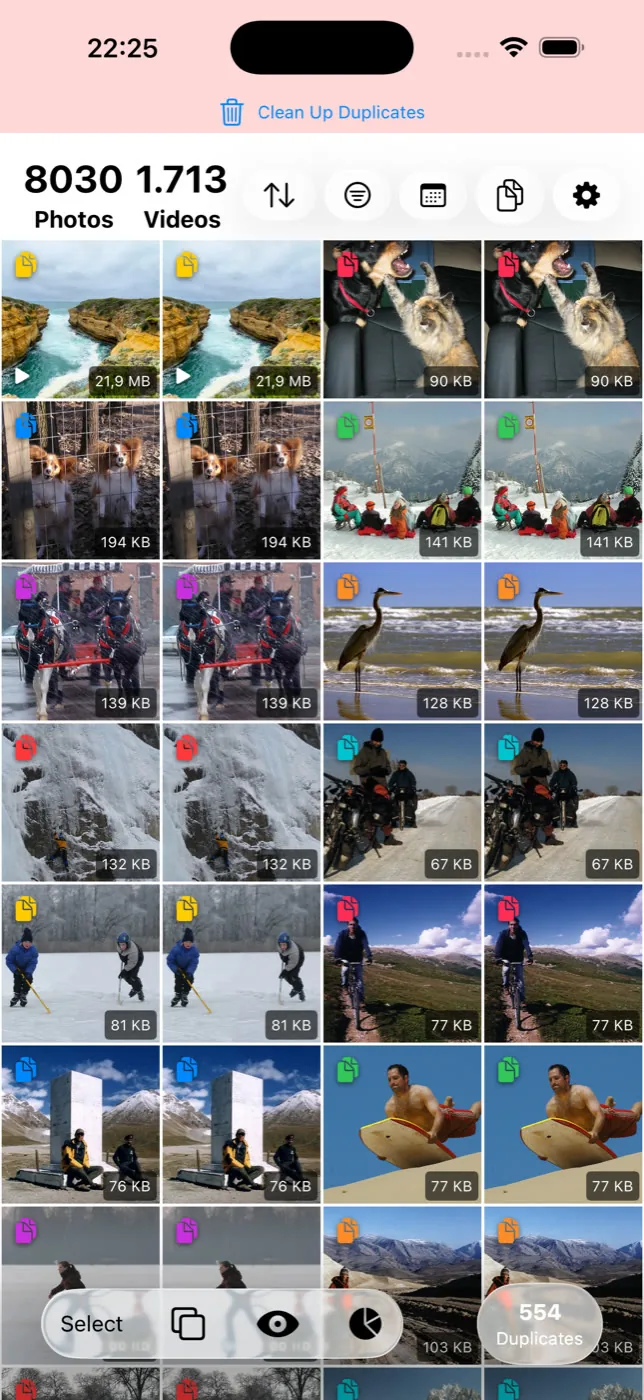
What grouping can and cannot get right
Grouping is strongest where the volume is: a burst, a set of retakes, several attempts at one shot taken within a short span. It is less certain about two photos of the same view taken hours apart, or a heavily cropped version of an existing photo, because those depend on how much the content actually changed.
Which frame in a group is the one worth keeping — whose eyes are open, which is sharper, which one you actually like — is not something any tool computes. That decision stays yours. What grouping does is put the candidates next to each other so you make that call once per group instead of once per photo.
Videos are handled more loosely than photos in any similar-photo tool, since comparing a video means comparing a frame from it rather than the whole clip, and that makes video groups worth a closer look before deleting.
iPhone has the same gap for a different reason — Apple ships a Duplicates album but no similar-photo finder. The iPhone version of this page is here.
Questions people actually ask
- Does Google Photos have a similar-photo finder I'm just not seeing?
No dedicated one. Google Photos occasionally stacks bursts or surfaces similar-photo prompts as part of its own background processing, but there is no menu option to run a similar-photo scan on demand, and it does not cover your whole library systematically.
- Why didn't Files by Google find my near-identical photos?
Because it is a duplicate-file finder, not a similar-photo finder. It matches files that are effectively the same image. Photos that are genuinely different files — different frames of a burst, separate retakes — are outside what it looks for by design.
- Can a similar-photo app tell me which photo in a group is the best one?
No tool can compute that reliably — whether eyes are open, which frame is sharpest, which one you prefer is a judgment call. What a similar-photo tool does is group the candidates together so you can make that choice in seconds instead of scrolling past them individually.
- Will a similar-photo scan on Android upload my photos anywhere?
Not with Slean — comparison happens on the phone and the library is not sent anywhere. Check any app's privacy claims specifically, since "similar photo" scanning genuinely requires comparing image content, which is exactly the kind of processing worth confirming stays local before you trust an app with your library.
- Does similar detection work as well on Android as on iPhone?
Yes. Slean is written natively for each platform — Kotlin on Android, Swift on iOS — and similar detection, duplicate detection, the filters and bulk review are the same on both. Android is not a stripped-down port, which is unusual in this category: most photo cleaners are iPhone-only or ship a thin Android version.
Sources
Related reading
- Duplicate photos and similar photos are not the same problemA duplicate is a second copy of one photo. A similar photo is a different photo that looks close to it. Most phones only find the first kind.
- How to delete duplicate photos on AndroidFiles by Google and Samsung's My Files find exact duplicates free. The steps, why WhatsApp causes most of them, and what both tools miss.
- What a photo cleaner app on Android actually doesWhat an Android photo cleaner actually does, what to check before installing one, and what Files by Google and Google Photos already give you free.
- How to find similar photos on iPhoneThe Photos app has no similar-photo finder — only a Duplicates album, and that's a different thing. Here is what actually helps, and what still needs an app.
Slean's similar mode is the systematic pass Android does not have — grouped on the phone, reviewed before anything goes.

