What a photo cleaner app on Android actually does
A photo cleaner on Android scans your photo library, groups duplicate and near-identical photos, and lets you review and bulk-delete them. That is the whole job — it does not speed up your phone or clean system junk. Files by Google and Google Photos cover the easy cases; similar-photo grouping and size sorting are the gap.
By Emre, who builds Slean. Updated 1 September 2026.
Your phone says storage is full, you search the Play Store for "photo cleaner", and you get a wall of apps with near-identical icons, most of them promising to boost your phone as well. It is not obvious from a store listing which ones actually do the job.
This page is about telling the two apart.
What a photo cleaner actually does
Strip away the marketing and a real photo cleaner does three things. It scans your library and compares photos to each other. It groups the ones that match — either exact duplicates or photos that look alike, which are different problems with different tools. And it lets you review those groups and delete in bulk instead of long-pressing one photo at a time.
That is genuinely useful. A phone with eight thousand photos and a hundred near-identical shots of the same three trips is a real, common situation, and scrolling through it manually to find what to delete is a bad use of an evening.
What it does not do
A photo cleaner does not make your phone faster. Photo storage and processor speed are unrelated, and any app implying a link between the two is selling you something. It does not clean "system junk" in any meaningful sense either. Since Android tightened storage permissions, an ordinary app cannot reach inside other apps' files, so what gets counted as junk is mostly cache — which rebuilds itself the next time you open the app, and which Android already clears on its own when storage runs low.
If an app's main pitch is a speed boost, a battery saver, or a single giant "Clean Now" button that scans your whole phone rather than your photo library specifically, that is a strong signal it is built to run ads against a vague promise rather than solve a specific problem.
How to judge one before installing it
Install counts and star ratings do not help much here, because a big number on a progress bar feels like success whether or not anything useful happened. These five checks take a minute on the store listing and tell you more.
- What permissions does it ask for. A photo cleaner needs access to your media. It does not need contacts, call logs, SMS, or your location history. If it asks for those, that is the actual product — your data, not your storage.
- Does it show ads, and how many. A full-screen ad between every action, or a mandatory ad before you can see your own scan results, tells you where the incentive sits.
- Does it need an account. A photo cleaner has no reason to need sign-in. Your library lives on your phone; scanning it does not require identifying you.
- Does it claim to clean system junk or boost speed. Covered above — treat this as a red flag rather than a bonus feature.
- Can you see the results before committing to anything. An app that scans your library and then hides what it found is asking you to trust a number instead of your own eyes. Being able to review the groups is the whole point.
What Files by Google and Google Photos already do free
Before installing anything, use what is already on the phone. Files by Google has a duplicate-files card under Menu → Clean that finds exact copies and marks one as the original — see how to delete duplicate photos on Android for the exact steps. Google Photos' Free up space button clears local copies of photos already backed up, which is a genuine way to recover phone storage, though it is offloading rather than deleting — full explanation here.
Both are free, both are made by Google, and both solve the mechanical half of the problem. What neither does is anything about near-identical shots, and neither will sort your gallery biggest file first.
Where a third-party app is worth it
The gap is similar-photo grouping. Android has no built-in tool that finds bursts, retakes and near-duplicate shots the way it finds exact file copies — more on that here. If your actual problem is six versions of the same photo rather than one file saved twice, that gap is where a dedicated app earns its place.
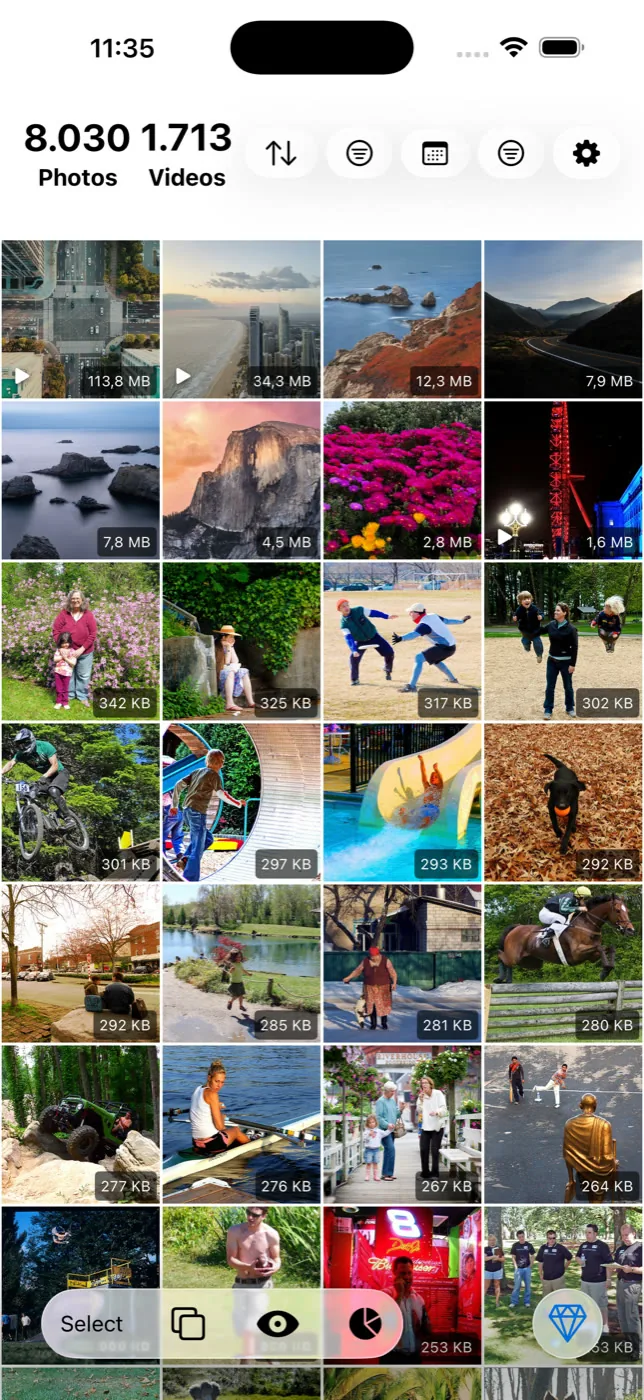
Slean is built for exactly that gap. It sorts your gallery by file size, runs duplicate and similar detection on the phone using detection written for Slean rather than an off-the-shelf library, filters by screenshots, size, date and album, and shows every group full screen before anything is deleted. No ads, no account, nothing outside your photo library. It is a photo cleaner that does that one job properly instead of an "everything app" with a progress bar.
A reasonable way to decide
Run Files by Google's duplicate finder first. It is free, fast, and handles the risk-free case. Then find out what is actually taking up space — long videos and messaging-app media usually outweigh photos, and a size sort answers that in seconds. What is left is the near-identical shots, and that is the part worth installing something for. Be picky about which one.
Most of what is on this page applies to iPhone too, with different built-in tools. What to delete first when an iPhone is full.
Questions people actually ask
- Are Android photo cleaner apps safe to use?
Some are, many are not — the category is full of apps built primarily to run ads against a vague "clean" action. Check what permissions an app requests, whether it needs an account, and whether it claims to clean system junk or speed up your phone, which no photo cleaner genuinely does. Apps that only ask for media access and only touch your photo library are the safer pattern.
- Do photo cleaner apps actually delete files or just hide them?
A properly built one deletes for real, through Android's normal media deletion, which is why deleted items land in Trash in Google Photos or the gallery app for at least 30 days rather than disappearing instantly. If an app's "cleaned" total does not match any visible drop in storage used, be suspicious of what it actually did.
- Why does a cleaner app say it found gigabytes of junk on my Android phone?
Often because it is counting app caches, which are not junk in any lasting sense — they rebuild automatically as you use the app again, and Android already clears them under storage pressure on its own. A large "junk found" number is an easy thing to show on screen; it is not the same as a large amount of storage permanently recovered.
- Is Files by Google enough, or do I need a separate app?
Files by Google handles exact duplicate files well and is worth using first. It has no equivalent for near-identical photos — bursts, retakes, several attempts at one shot — and it will not sort your gallery by file size. That is the gap a dedicated photo cleaner like Slean fills, rather than duplicating what is already free.
- Does a photo cleaner app need access to my contacts or messages?
No. Cleaning a photo library only requires access to your media. A request for contacts, SMS, call logs or location history has nothing to do with finding duplicate photos and is worth treating as a reason to uninstall.
Sources
Related reading
- How to delete duplicate photos on AndroidFiles by Google and Samsung's My Files find exact duplicates free. The steps, why WhatsApp causes most of them, and what both tools miss.
- How to find similar photos on AndroidAndroid finds duplicate files but has no tool for near-identical photos. What Google Photos does instead, and how to clear a library full of them.
- Android storage full? Here is what to delete, in orderLong videos first, then messaging-app media, then screenshots, then duplicates, then caches. The order matters more than the effort you put in.
- iPhone storage full? Delete these first, in this orderNot everything you could delete returns the same amount of space. Here's the order that actually works, from long videos down to app caches.
Slean on Android: sort by file size, find the duplicates and the near-identical shots, review full screen, delete in bulk.

