How to compress a video on Android
Android has no universal video compressor. A gallery's "resize when sharing" only compresses the copy you send, WhatsApp compresses on send too, and Google Photos backup quality affects the cloud copy, not the file on your phone. Slean compresses the actual file on the device, with a size preview before you save.
By Emre, who builds Slean. Updated 1 September 2026.
Android does not have one compress-a-video feature, and that is the first thing worth knowing before you go looking for it. What you get depends on which gallery app came with your phone, which messaging app you use, and how Google Photos is set up — and several of the things that sound like compression are actually something narrower.
"Resize when sharing" only touches the copy you send
Some Android galleries, including Google Photos on some devices and Samsung's Gallery, offer a size-reduction toggle in the share sheet — sometimes labelled "resize", sometimes "reduce size". Turn it on, share a video, and the recipient gets a smaller file. The video sitting in your own gallery is untouched; this setting only shrinks the outgoing copy at the moment you share, and it does nothing for your phone's storage.
WhatsApp compresses what it sends, not what you have
Every video and photo sent through WhatsApp is compressed automatically before it leaves your phone — that is why photos texted through WhatsApp often look slightly worse than the original. This changes the copy WhatsApp transmits. It does not touch the source file in your gallery, and there is no setting anywhere in WhatsApp that reaches back and shrinks videos you already have.
Google Photos backup quality is a cloud setting, not a phone one
Google Photos backs up at either Storage saver or Original quality, and that choice controls the version stored in your Google account. It does not compress or otherwise change the file sitting on your phone — that stays exactly as recorded regardless of which backup quality you pick. Separately, Free up space can remove the local copy of anything already backed up, which frees phone storage without shrinking or deleting a single photo from your library.
The direct route: compress the file itself
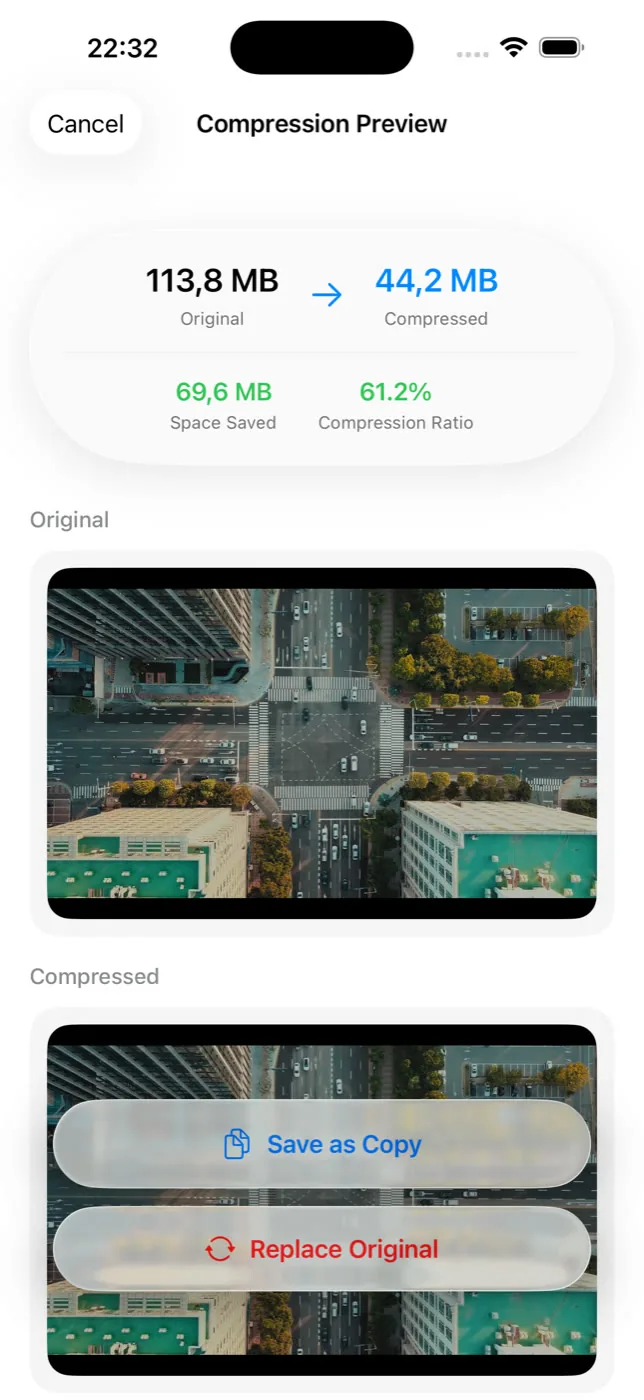
None of the above changes the video that is actually taking up space on your device. Slean does that directly — it compresses the file on the phone and shows the size before and after, so you can see exactly what you would save before committing to anything.
What it costs
Compression works by lowering bitrate, and that shows up first in motion and low light — footage that was already a little soft gets softer, fast movement can pick up blockiness it did not have before. On a phone screen it is rarely noticeable. On a bigger screen, or footage you plan to edit later, it is a real trade, worth making on purpose rather than by default.
iPhone has a comparable gap — no built-in compressor, and the nearest camera setting only changes recordings you haven't made yet. How it works there.
Questions people actually ask
- Does turning off 'reduce data usage' in WhatsApp change videos already on my phone?
No. That setting controls how WhatsApp compresses media as you send it going forward. It has no effect on videos already sitting in your gallery, sent or not.
- Does Google Photos' Storage saver setting shrink videos on my device?
No. Storage saver controls the quality of the copy uploaded to your Google account. The video file stored on your phone stays exactly as it was recorded, at its original size, regardless of the backup quality setting.
- Will compressing a video that's already backed up remove or change the cloud copy?
No. Compressing on the phone changes the local file only. The version already backed up to Google Photos is untouched unless you separately re-upload the compressed copy, which is not something compression does automatically.
- Why doesn't my phone's own gallery app have a compress option?
Because it generally doesn't exist as a built-in tool on Android. Stock galleries offer backup-quality settings and a resize-on-share option for outgoing files, but compressing the video that is actually stored on the device is not something the default apps do.
- Does every Android phone compress video the same way when sending?
No. It depends on the app doing the sending and the manufacturer's gallery, which is part of why Android is harder to give one universal answer for than iPhone. A messaging app's compression, a gallery's share-resize option, and an actual on-device compressor are three different things that can behave differently on different phones.
Sources
Related reading
- How to compress a video on iPhoneThe Photos app has no compressor. Settings → Camera → Record Video only changes future clips. Here is how to shrink a video you already have.
- Android storage full? Here is what to delete, in orderLong videos first, then messaging-app media, then screenshots, then duplicates, then caches. The order matters more than the effort you put in.
- How to free up space on Android without deleting photosReal options that don't touch your library: offload backed-up copies, clear caches, use an SD card, uninstall apps, compress instead of remove. Where each one stops.
Slean compresses the file that is actually on your phone, not a copy on its way out — with the size shown before you save.

