Best photo cleaner app for iPhone: five names, and how to choose between them
The best photo cleaner app for iPhone depends on what is filling the phone. Exact copies: the Photos app's Duplicates album, free. A few oversized videos: an app that sorts by file size, which Slean does across the whole library. Hundreds of near-identical shots: similar-photo grouping, which Clever Cleaner, CleanMy®Phone, Swipewipe and Slean all list, with very different privacy labels.
By Emre, who builds Slean. Updated 21 September 2026.
Ranking these apps is the wrong shape for the question, because they are good at different halves of the problem and most people do not know which half they have. But a page with "best" in the title that names nothing is a dodge. So: five names below, one of them mine, and everything about the other four comes from their App Store listings and their own help pages rather than from a weekend of benchmarks I did not run.
The short version, if you would rather skip the reasoning:
- Exact copies only. The Duplicates album already on your phone. Free, safe, no app.
- A few huge videos. You need a size sort. The Photos app has none. Slean sorts the whole library by size; Clever Cleaner sorts its videos, CleanMy®Phone sorts inside a category.
- Hundreds of near-identical shots. You need similar-photo grouping. All four apps list it; the Photos app does not have it.
- You care what the app collects. Read the privacy label before the reviews. Of the five here, one says Data Not Collected.
- You want to swipe through the lot by hand. Swipewipe, if you can live with its label and its weekly prices.
Find out what is actually filling your phone
- 1Settings, then General, then iPhone Storage. Wait for the list to load.
- 2Look at the number next to Photos. If it is most of your used space, the problem is in your library. If it is not, a photo cleaner is the wrong tool and the space is in apps, downloads or Messages.
- 3In Photos, open Media Types, then Videos. Scroll and look at the lengths.
- 4If a handful of long clips jump out, you have a video problem. If the videos are unremarkable and the library is simply enormous, you have a volume problem.
If it is a video problem
A few minutes of 4K can be several gigabytes, so three or four forgotten clips routinely outweigh every duplicate in a library. The thing you need is a way to see file sizes and order by them.
The Photos app cannot do this — there is no size column, no size sort and no size filter, and video length is only a rough proxy. Not every cleaner offers it, and the ones that do differ in how far it reaches, so check the listing for it specifically. The full walkthrough is here.
If it is a volume problem
Then what you need is grouping, and specifically grouping of photos that are not identical. Your phone already handles the identical ones: Collections, then Utilities, then Duplicates, free, and it merges them keeping the highest-quality version.
What it will never show you is the six frames you shot of one doorway, because those are six different photographs. That gap is the actual reason this category exists, and it is the first thing to check any app for.
Five photo cleaner apps for iPhone, from their own listings
Everything in this table comes from the US App Store listings and the developers' own help pages as of 21 September 2026. The feature columns say what each developer claims, not what I measured: I have not timed scans or counted false positives across four apps, and I am not going to write as if I had. Costs are the listing's; developers change them, so treat the numbers as a snapshot and the listing as the source.
| App | Similar shots | Sort by size | Compression | Privacy label | Cost |
|---|---|---|---|---|---|
| Photos, Duplicates album | No, exact copies only | No | No | Part of iOS | Free |
| Clever Cleaner | Yes | Videos and screenshots | Yes | Tracks you. Device ID and usage data linked to you. | Free within daily limits; $6.99 a week after a 3-day trial, or $39.99 once, to remove them |
| CleanMy®Phone | Yes | Inside each category | Yes | Tracks you. Email address and device ID collected. | Free for Largest Videos, Screenshots and Other; $7.99 a month or $36.99 a year for the rest |
| Swipewipe | Yes | Not listed | Not listed | Tracks you. Data linked to you, including for third-party advertising. | Free to install; $3.99 to $9.99 a week, or $29.99 a year, for the paid tiers |
| Slean | Yes, as a separate pass | Whole library, size on every thumbnail | Yes, with a preview | Data Not Collected | Free. No ads, no account. |
Photos, and its Duplicates album
Start here whatever else you install, on iOS 16 or later. Collections, then Utilities, then Duplicates: it finds exact copies and merges them, keeping the higher-quality file and the metadata. It costs nothing and it cannot surprise you. What it will not do is group the six frames of that doorway, and it has no idea which of your videos are large. What it finds and what it quietly skips.
Clever Cleaner
CleverFiles, the Disk Drill company; iOS 16 or later, a 123 MB download. This is the app the lists recommend as the free one, and the free tier is real: the listing promises daily limits generous enough to clean within without paying, with $6.99 a week after a three-day trial, or $39.99 once, to remove them. It finds duplicates and similar photos, sorts videos and screenshots by size, compresses what you would rather keep, and has a swipe mode with no daily limit. Two things the lists leave out. One of the sites recommending it is the developer's own, and another reviews the developer's other products in the same breath. And the privacy label declares identifiers used to track you across other companies' apps, plus a device ID and usage data linked to you. Scanning on the device and shipping a tracking SDK are not mutually exclusive, and this label is what the combination looks like.
CleanMy®Phone
MacPaw, the CleanMyMac company; iOS 17 or later, a 176 MB download, and it looks like a MacPaw app: the polish is the point. It finds duplicates and similar shots, sorts by size inside any category, compresses videos, and has a swipe mode of its own. The free version is narrower than the listing's Free badge suggests. MacPaw's help pages say it covers the Largest Videos, Screenshots and Other categories, with everything else behind $7.99 a month or $36.99 a year, and a trial to test it first. The label declares identifiers and usage data used to track you, and an email address and device ID collected for advertising and analytics. If you have a very large library and would rather pay for something that feels finished, it is the obvious candidate.
Swipewipe
MWM's, and the swipe format: one photo at a time, left to delete, right to keep. If you genuinely enjoy that, this is the most established app doing it. The listing also promises similar-photo, blurry-shot and screenshot detection; it says nothing about sorting by size or about compression. It needs iOS 18 and is a 237 MB download, the largest of the five. Its label is the fullest of the five too: identifiers, usage data and "other data" used to track you, with third-party advertising among the declared purposes. Free to install, with paid tiers from $3.99 to $9.99 a week, or $29.99 a year.
Slean
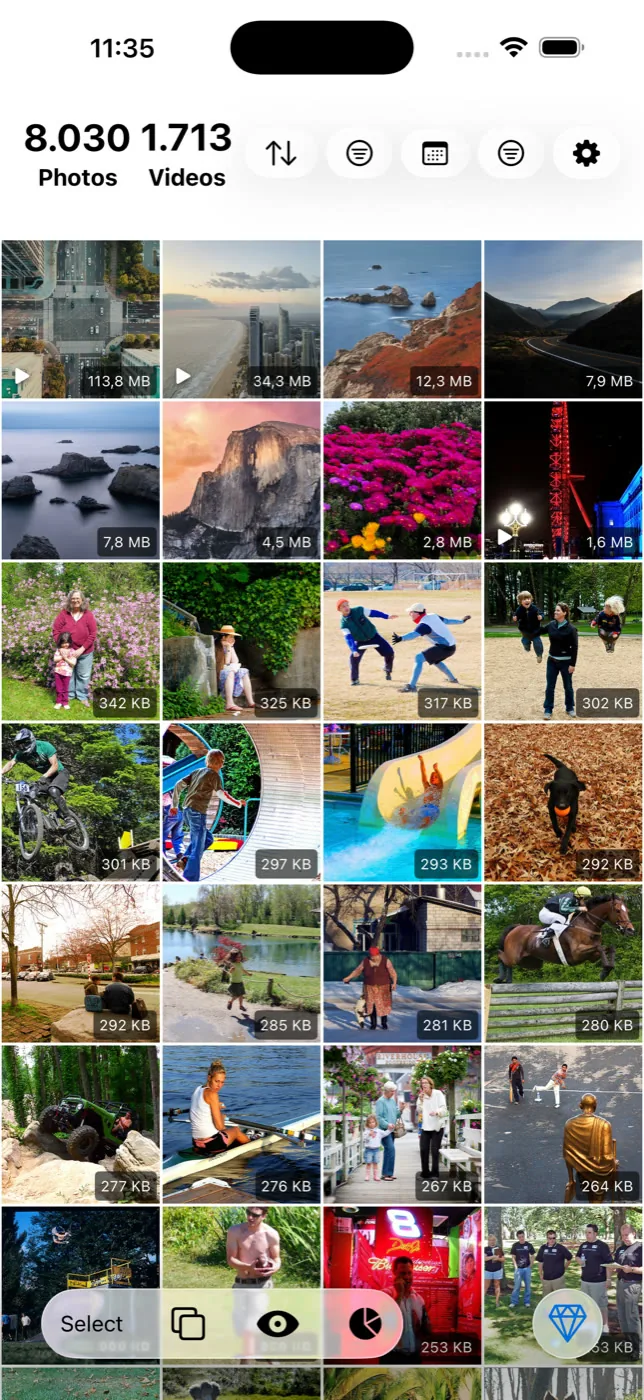
Mine, so discount accordingly. What I can point to rather than argue for: the label says Data Not Collected, which is Apple's wording for a developer that ticked none of the boxes; there are no ads and no account; the download is 72 MB and it runs back to iOS 15. It sorts the whole library by file size, not one category at a time, and prints the size on every thumbnail, which is the difference between knowing what is filling your phone and guessing. It runs duplicates and near-identical shots as two separate passes, so you decide how aggressive the second one is, and compression shows the saving before anything is written. It is free, with no ads and no account. What it does not do: swipe review, contacts, email, anything outside the photo library.
What separates the good ones once you know
- Similar-photo grouping, not just duplicate detection. Without it you are paying for something your phone does free.
- A way at file size — sorting, or at minimum a size filter with the size shown on each item.
- Review before deletion. Every group visible, nothing removed that you did not select.
- A privacy label you have actually read. It is on the listing under App Privacy, it takes ten seconds, and the table above shows how much it varies between apps that all say "on-device".
- No ads and no account. Neither is necessary to clean a library that lives on your phone.
One thing worth ignoring: install counts and star ratings. A cleaner that shows a large number on a progress bar feels successful whether or not it did anything useful, and it gets rated accordingly.
Who should not install any of these
Three cases. If your library is a few thousand photos and the Duplicates album comes up empty, the built-in tools plus an occasional evening are enough, and a cleaner is a solution looking for a problem. If you will not review before deleting, and plenty of people will not, no grouping is accurate enough to be trusted blind, and an app that lets you clear an unreviewed group is a fast way to lose the one good frame of a burst. And if iCloud Photos is on, a cleaner deletes from the shared library, not just the phone. "Free space on this device" and "delete from everywhere" are the same tap. Make sure that is what you want before a big pass.
The order that wastes the least time
Run the built-in Duplicates album first — free, safe, no decisions. Then deal with your largest videos, because that is where the gigabytes are. Then, when you have ten quiet minutes, do the pass through near-identical shots, which is the one that needs your eyes. The full triage order is here.
Questions people actually ask
- Does the iPhone have a built-in photo cleaner?
Partly. The Photos app has a Duplicates album under Utilities that finds and merges exact copies, and Settings has storage recommendations. Neither groups near-identical shots and neither can sort your library by file size, which is where a third-party app earns its place.
- Which photo cleaner apps for iPhone are actually free?
The Duplicates album and Slean are free outright. Clever Cleaner is free within daily limits, with a paid tier to remove them. CleanMy®Phone's free version covers three categories, Largest Videos, Screenshots and Other, and the rest is paid. Swipewipe is free to install, with paid tiers priced by the week.
- Which photo cleaner app collects the least data?
Read the App Privacy section of each listing rather than the website. As of September 2026, Slean's label says Data Not Collected. Clever Cleaner, CleanMy®Phone and Swipewipe each declare Data Used to Track You, with identifiers at minimum. The Photos app is part of iOS and covered by Apple's own policy.
- Why is my iPhone still full after deleting hundreds of photos?
Usually two reasons. Recently Deleted still holds them at full size for around 30 days, so empty it. And photos are small compared to video — hundreds of photos can be a fraction of a single long 4K clip.
- Will a photo cleaner delete photos from iCloud too?
Yes, if iCloud Photos is on. It is one synced library, so removing a photo on the phone removes it everywhere once it leaves Recently Deleted. That is usually what people want, but it is worth knowing before a large pass.
- Do I need to back up before running a cleaner?
It is the right habit before removing thousands of photos in an evening. A well-built cleaner only deletes what you selected, and Recently Deleted gives you around 30 days of grace, but neither is a substitute for having a copy.
- How long does a first scan take?
It depends on library size, and a large library takes a while on any app, because every cleaner has to read and compare each item once. Later scans are faster. If an app finishes a forty-thousand-photo library instantly, be suspicious of what it actually compared.
Sources
- Apple Support — Merge duplicate photos and videos on iPhone
- Apple Support — Manage your photo and video storage
- App Store — Clever Cleaner: AI CleanUp App (listing, privacy label, in-app purchases)
- App Store — CleanMy®Phone: Cleanup Storage
- MacPaw Support — CleanMy®Phone free and premium
- MacPaw Support — Sort photos and videos in CleanMy®Phone
- App Store — Swipewipe: Photo Cleaner
- App Store — Slean: Cleaner & Pixel Stretch
Related reading
- How to choose a photo cleaner, in about five minutesSix checks you can run on a store listing before installing anything, and the two questions that actually separate a good photo cleaner from a bad one.
- How to find your largest videos and photos on iPhoneThe Photos app can't sort by file size, so your biggest videos and photos stay hidden. What works instead, and how to shrink a file rather than delete it.
- What the iPhone's Duplicates album finds, and what it quietly skipsThe Photos app has a built-in duplicate finder. It works well, it is free, and it only looks for copies. Here is where it stops and what to do about the rest.
- Duplicate photos and similar photos are not the same problemA duplicate is a second copy of one photo. A similar photo is a different photo that looks close to it. Most phones only find the first kind.
Slean covers both halves, and its listing says Data Not Collected. Read that section on whichever cleaner you pick, mine included.

